
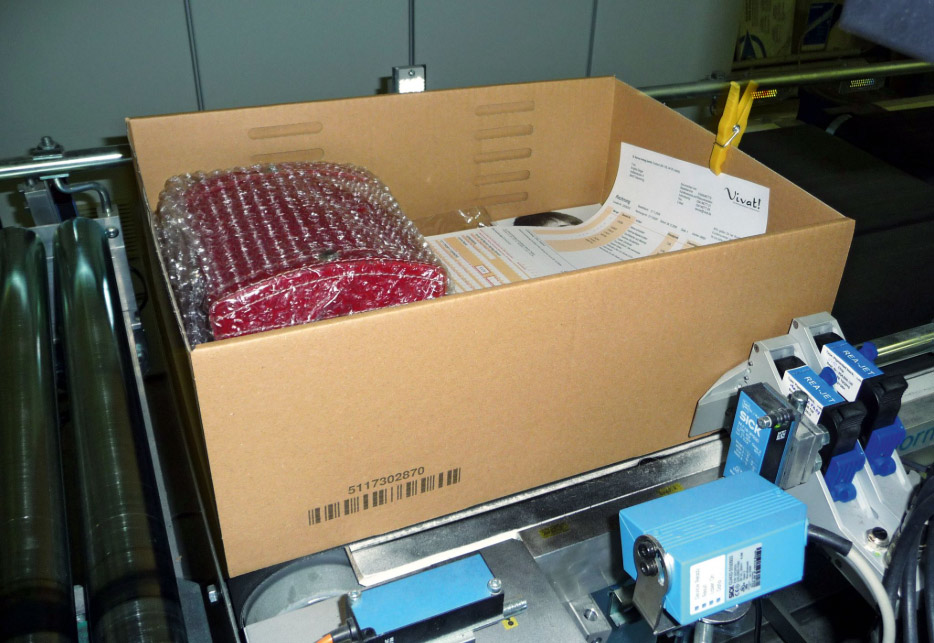
Cartons and cases play a critical role in product identification, distribution, inventory management, and supply chain traceability.
While primary packages typically carry consumer-facing information such as expiration dates, product identifiers, and retail barcodes, secondary packaging must also communicate accurate production and logistics data. Lot codes printed on cartons and corrugated cases help manufacturers, distributors, retailers, and warehouse teams connect packaged products to their production history.
For manufacturers, learning how to print lot codes on cartons and cases requires more than installing a printer beside a conveyor. Reliable case and carton coding depends on several interconnected factors, including:
- Packaging substrate
- Production speed
- Required code content
- Print resolution
- Ink selection
- Code placement
- Product handling
- Data integration
- Verification
- Environmental conditions
A code that appears clear at the packaging line may become unreadable after abrasion, moisture exposure, stacking, palletizing, transportation, or warehouse handling.
Poorly printed or incorrect lot codes can create serious operational problems, including delayed shipments, retailer complaints, rework, traceability gaps, and expanded recall risk.
This guide explains how manufacturers can produce clear, accurate, and durable lot codes on cartons and cases while improving packaging line efficiency and supply chain visibility.
Why Lot Codes Matter on Cartons and Cases
Lot codes identify products produced under the same or similar manufacturing conditions. A lot may be defined by:
- Production date
- Production shift
- Manufacturing facility
- Packaging line
- Time window
- Ingredient or component group
- Production batch
- Packaging material lot
Printing this information on cartons and cases allows manufacturers to connect secondary packaging with production and quality records.
Lot codes support several important functions.
Product Traceability
Lot codes create a physical link between packaged products and their production records. When a carton or case is scanned or visually inspected, the manufacturer can determine:
- When the products were made
- Where they were produced
- Which line was used
- Which materials were involved
- Which quality checks were completed
Recall Readiness
If a product issue is discovered, lot coding helps manufacturers identify affected inventory. Clear secondary packaging codes make it easier to locate products in:
- Warehouses
- Distribution centers
- Retail backrooms
- Shipping areas
- Palletized loads
This can reduce the scope and cost of a recall.
Inventory Management
Lot information supports inventory rotation and warehouse control. Manufacturers and distributors can use lot codes to manage:
- First-in, first-out processes
- First-expired, first-out processes
- Product holds
- Quality investigations
- Shelf-life monitoring
Customer and Retailer Compliance
Retailers, distributors, and logistics partners may require specific lot, date, barcode, or labeling formats. Failure to meet those requirements can result in:
- Chargebacks
- Shipment rejection
- Manual relabeling
- Delivery delays
- Additional inspections
Understand the Difference Between Cartons and Cases
The terms carton and case are sometimes used interchangeably, but they can refer to different packaging levels.
Cartons
Cartons are commonly made from paperboard and may serve as either primary or secondary packaging. Examples include:
- Cereal boxes
- Pharmaceutical cartons
- Frozen food cartons
- Cosmetics boxes
- Small multipack cartons
- Consumer product boxes
Cartons often have smooth, printed, coated, or laminated surfaces.
Corrugated Cases
Cases are generally made from corrugated fiberboard and are used to group products for shipping and distribution. Examples include:
- Beverage cases
- Food shipping cases
- Consumer goods cartons
- Industrial component cases
- Retail-ready packaging
- Distribution boxes
Corrugated cases often have more porous and uneven surfaces than paperboard cartons. These substrate differences affect printer selection, ink behavior, resolution, and code durability.
Determine What Information the Lot Code Should Include
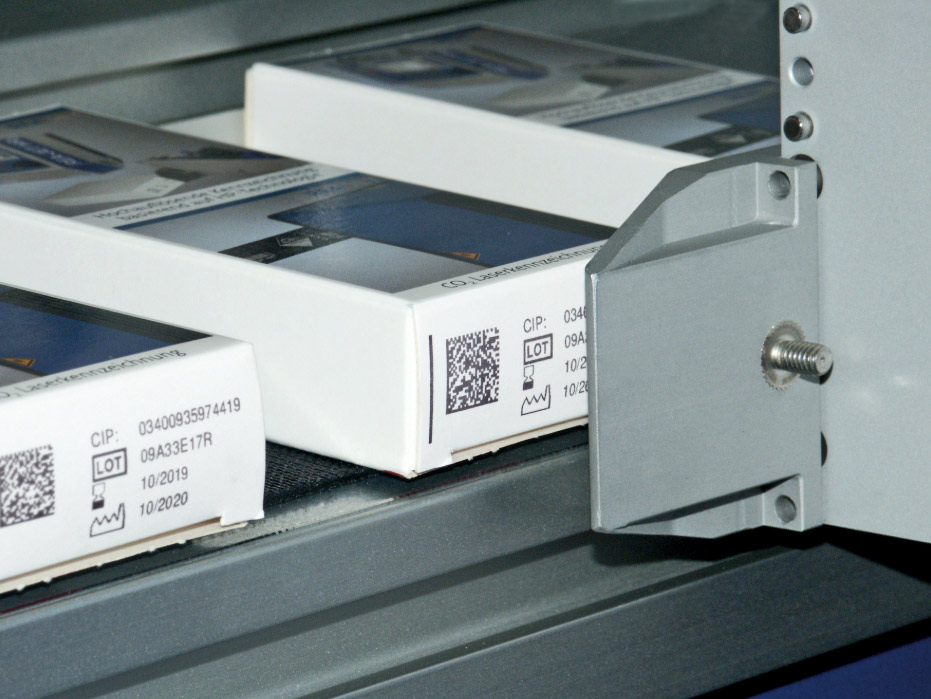
Before choosing equipment, manufacturers should define the required code content. A lot code may include:
- Lot number
- Batch number
- Production date
- Packaging date
- Expiration date
- Best-before date
- Manufacturing location
- Line number
- Shift
- Time
- Product identifier
Some applications require only a short alphanumeric code. Others require:
- Human-readable text
- Linear barcodes
- GS1-128 codes
- ITF-14 codes
- Data Matrix codes
- QR codes
- Logos
- Handling information
More complex codes generally require higher-resolution printing and better substrate control. Manufacturers should also consider whether the code must be readable by people, machines, or both.
Establish a Standard Lot Coding Format
Consistency is essential for traceability. A standardized lot coding structure should define:
- Number of characters
- Date format
- Plant identifier
- Line identifier
- Shift code
- Batch sequence
- Product identifier
- Separator characters
For example, a manufacturer may use a code that combines:
- Facility
- Production date
- Line
- Shift
A standardized format makes codes easier to interpret and reduces confusion across facilities. The format should be documented and controlled. Operators should not be allowed to create new lot structures without approval from quality, operations, or regulatory personnel.
Choose the Right Technology for Carton Coding
Several technologies can be used to print lot codes on cartons. The correct choice depends on surface type, production speed, print quality, and code content.
Thermal Inkjet
Thermal Inkjet, or TIJ, is commonly used for paperboard cartons because it provides high-resolution printing. TIJ systems can produce:
- Small text
- Lot codes
- Date codes
- Linear barcodes
- Data Matrix codes
- QR codes
- Logos
Benefits include:
- Crisp print quality
- Compact printheads
- Simple integration
- Fast message changes
- Minimal maintenance
TIJ works especially well on porous or semi-porous cartons. Specialized inks may be required for coated or nonporous surfaces.
Continuous Inkjet
Continuous Inkjet, or CIJ, can also be used on cartons, especially when the packaging line runs at high speed. CIJ provides:
- Non-contact printing
- Flexible printhead positioning
- Reliable operation on moving products
- Good performance in demanding environments
CIJ is often selected for simpler text-based lot and date codes. For detailed barcodes or small 2D codes, manufacturers should confirm that the selected system provides adequate resolution.
Laser Marking
Laser marking may be used on certain cartons when the packaging coating or ink responds well to laser energy. The laser may create a code by:
- Removing a coating
- Changing surface color
- Ablating printed artwork
- Exposing a contrasting layer
Laser systems offer:
- Permanent codes
- No ink
- Minimal consumables
- Reduced routine maintenance
However, application testing is essential. The laser must create sufficient contrast without damaging the package or product.
Choose the Right Technology for Corrugated Case Coding
Corrugated cases present different challenges than smooth cartons. Their surfaces may be:
- Porous
- Rough
- Uneven
- Absorbent
- Dusty
- Recycled
- Variable in color
The most common case coding technologies include high-resolution inkjet and print-and-apply labeling.
High-Resolution Inkjet
High-resolution inkjet systems print directly onto corrugated cases. They can produce:
- Lot codes
- Product descriptions
- Barcodes
- Shipping information
- Logos
- Handling instructions
- Variable data
Direct case printing can reduce reliance on preprinted inventory and labels. Manufacturers can use generic cases and print product-specific information during production. Benefits may include:
- Reduced packaging inventory
- Lower label use
- Faster product changeovers
- Greater flexibility
- Improved sustainability
The code size and design should account for the absorbency and texture of corrugated material.
Print-and-Apply Labeling
Print-and-apply systems create a label and automatically apply it to the case. These systems are often selected when:
- Very high barcode quality is required
- Direct printing is impractical
- The case surface is inconsistent
- Retailers require standardized logistics labels
- Large amounts of variable data are needed
Labels can provide a smooth, controlled surface for:
- GS1-128 barcodes
- SSCC codes
- Shipping information
- Product identifiers
- Lot data
However, label materials, adhesive selection, and application accuracy must be carefully controlled.
Direct Printing Versus Labels
Manufacturers often need to decide whether to print directly onto the carton or case or apply a printed label.
Advantages of Direct Printing
Direct printing may provide:
- Lower consumable costs
- Less label waste
- Reduced packaging inventory
- Faster changeovers
- Fewer moving parts
- Less risk of label detachment
Advantages of Labels
Labels may provide:
- Higher contrast
- Better barcode consistency
- More room for information
- Improved performance on rough surfaces
- Greater flexibility for customer-specific requirements
The best approach depends on code complexity, substrate consistency, customer standards, production speed, and total cost of ownership.
Match the Ink to the Substrate
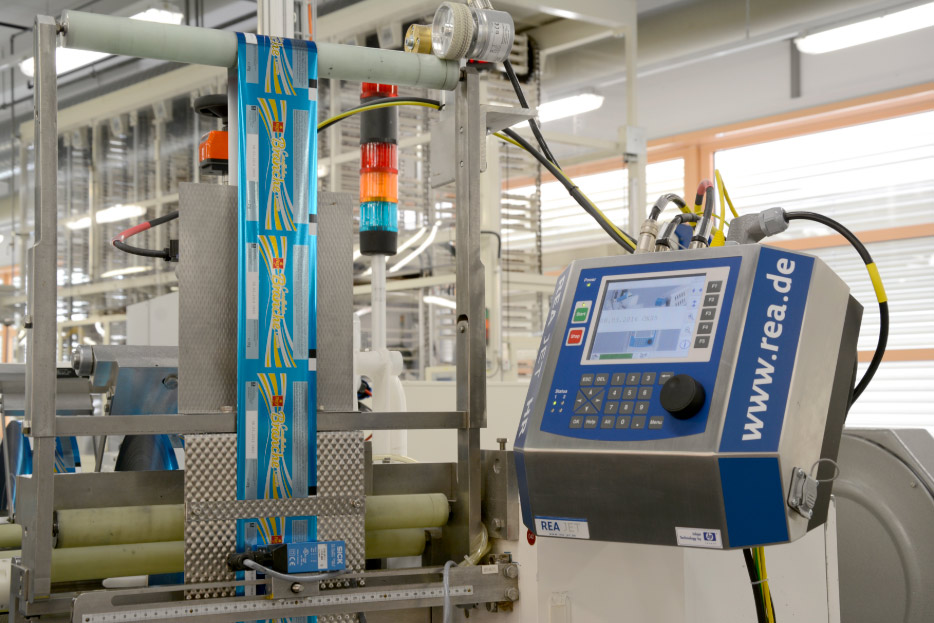
Ink selection has a major impact on code quality. Carton and case surfaces can vary widely. Common surfaces include:
- Uncoated paperboard
- Clay-coated cartons
- Gloss-coated cartons
- Kraft corrugated board
- White corrugated board
- Recycled corrugated material
- Laminated cartons
- Wax-coated cases
Ink must provide:
- Strong contrast
- Proper adhesion
- Acceptable drying time
- Resistance to abrasion
- Stable barcode dimensions
Porous surfaces absorb ink quickly. This can improve drying but may also cause dot spread or print growth. Nonporous and coated cartons may require fast-drying inks designed for low-absorption materials. Application testing should always be performed using the actual production substrate.
Account for Corrugated Surface Variation
Corrugated board is not perfectly flat. The liner may contain:
- Fibers
- Recycled content
- Flute impressions
- Surface irregularities
- Dust
- Color variation
These characteristics can affect code quality. Manufacturers should consider:
- Larger text
- Larger barcode dimensions
- Wider bars and spaces
- Reduced data density
- Stronger contrast
- Controlled printhead distance
Small, highly detailed codes may be difficult to reproduce consistently on rough corrugated surfaces. When high-density 2D codes are required, a label or smoother print panel may be the better solution.
Select the Best Code Location
Lot code placement should be standardized and easy to locate. The code should be positioned:
- On a flat panel
- Away from seams
- Away from folds
- Away from tape
- Away from glue areas
- Away from straps
- Away from pallet contact points
- Away from high-abrasion surfaces
For cases, the code should remain visible after:
- Case sealing
- Palletizing
- Stretch wrapping
- Shipping
- Warehouse stacking
Printing near the bottom of a case may expose the code to abrasion or obstruction. Printing near tape seams may make the code difficult to read. Placement should also allow access for scanners and vision inspection systems.
Maintain Proper Printhead Distance
Printhead distance affects print sharpness. If the printhead is positioned too far from the carton or case, the code may become:
- Blurred
- Distorted
- Stretched
- Misaligned
If the printhead is too close, the package may strike and damage it. Manufacturers should use:
- Stable mounting brackets
- Conveyor guides
- Product rails
- Height adjustment mechanisms
- Package detection sensors
The packaging surface should pass the printhead at a consistent distance. This is especially important for cases that vary in width or position.
Stabilize Cartons and Cases During Printing
Package movement can distort codes. Common problems include:
- Bouncing
- Tilting
- Sliding
- Rotating
- Conveyor vibration
- Sudden speed changes
These issues may cause:
- Uneven character spacing
- Stretched barcodes
- Compressed barcodes
- Poor code placement
- Partial printing
Guides and conveyor controls should keep packages stable. Encoders may be used to synchronize printing with conveyor speed. Reliable product presentation is often just as important as printer quality.
Use Accurate Product Detection
Sensors trigger the print cycle when a carton or case reaches the coding position. A poorly aligned or dirty sensor can cause:
- Missing codes
- Double prints
- Printing between packages
- Incorrect print position
- Timing errors
Sensor selection should account for:
- Carton color
- Case reflectivity
- Surface texture
- Package spacing
- Conveyor speed
- Environmental dust
The sensor should be inspected and cleaned regularly.
Automate Lot Code Generation
Manual lot code entry increases risk. An operator may:
- Select the wrong message
- Enter the wrong date
- Use an incorrect batch
- Apply a previous product code
- Miscalculate shelf life
Manufacturers should automate data transfer whenever possible. Coding systems can receive information from:
- ERP systems
- Manufacturing execution systems
- Packaging line controls
- Product databases
- Warehouse systems
- Production order software
The system can automatically populate:
- Lot number
- Product identifier
- Production date
- Expiration date
- Line number
- Shift
This improves accuracy and speeds changeovers.
Use Approved Coding Recipes
Each product should have an approved coding recipe. The recipe may define:
- Code format
- Font
- Lot structure
- Date calculation
- Barcode type
- Print position
- Printer settings
- Packaging format
Operators should select from approved recipes rather than manually building messages. Role-based permissions can prevent unauthorized changes. Supervisors, engineers, or quality teams may retain permission to create and approve new formats.
Include Human-Readable Information
Even when cartons and cases use barcodes or 2D codes, human-readable text remains valuable. Employees may need to identify products when:
- Scanners are unavailable
- A code is damaged
- Inventory is inspected visually
- A recall investigation occurs
- A product is placed on hold
Human-readable information may include:
- Lot number
- Product name
- Date
- Quantity
- Facility
- Batch
The text should match the encoded data. A barcode containing one lot number and text showing another creates serious traceability risk.
Print Barcodes Correctly
Many cartons and cases require machine-readable codes. Common formats include:
- Code 128
- GS1-128
- ITF-14
- Data Matrix
- QR codes
Barcode quality depends on:
- Print resolution
- Contrast
- Size
- Quiet zones
- Bar width
- Module size
- Surface texture
- Ink spread
- Product movement
Codes should not be reduced below the minimum dimensions supported by the printer and substrate. Corrugated case barcodes often need to be larger than codes printed on smooth labels or cartons.
Control Ink Spread on Porous Cases
Corrugated board can absorb ink quickly. Excessive absorption may cause:
- Bars to widen
- Spaces to narrow
- Characters to blur
- 2D modules to merge
- Barcode grades to decline
Manufacturers can manage ink spread by adjusting:
- Ink formulation
- Drop size
- Print density
- Code size
- Printhead settings
- Conveyor speed
Barcode verification should be performed on actual production cases. A digital design file cannot predict how ink will behave on corrugated board.
Maintain Adequate Contrast
Strong contrast improves readability. Black ink on white corrugated material generally performs well. Kraft cases may require:
- High-density black ink
- Larger codes
- Increased print resolution
- A light print panel
- A white label
Manufacturers should avoid printing over:
- Existing graphics
- Dark areas
- Patterns
- Recycled fiber variations
- Tape
- Gloss coatings
The code area should be included in packaging artwork and case specifications.
Verify Every Lot Code
Printing a code does not confirm that it is correct. Automated vision inspection can verify:
- Code presence
- Lot number accuracy
- Date accuracy
- Barcode readability
- Code placement
- Print contrast
- Character formation
A vision system may compare the printed code to the production order or approved recipe. When a defect is detected, the system can:
- Reject the case
- Trigger an alarm
- Stop the line
- Record the event
Verification is especially important on high-speed packaging lines. A short coding failure can affect many cases before an operator notices the problem.
Understand Scanning Versus Barcode Verification

A scanner confirms whether a barcode can be decoded by that device. A barcode verifier evaluates print quality against established standards. A code may scan successfully with one scanner but fail elsewhere in the supply chain. Verification can measure:
- Symbol contrast
- Decodability
- Modulation
- Defects
- Quiet zones
- Bar width
- Axial nonuniformity
- Grid uniformity
Manufacturers should define acceptable barcode grades based on customer, retailer, industry, and GS1 requirements.
Inspect Codes Throughout the Production Run
A startup check is important, but code quality can change during production. Potential causes include:
- Printhead contamination
- Ink depletion
- Conveyor movement
- Package variation
- Sensor misalignment
- Environmental changes
- Equipment vibration
Manufacturers should inspect codes:
- At startup
- After product changeovers
- After printer adjustments
- After maintenance
- After ink or cartridge replacement
- At scheduled intervals
- At the end of the run
Continuous inline inspection provides the strongest level of control.
Create a Standard Changeover Process
Carton and case coding errors often occur during product changeovers. A standard process should include:
- Confirming the production order
- Clearing the previous product
- Selecting the new recipe
- Verifying the lot number
- Checking date calculations
- Adjusting printhead position
- Confirming package dimensions
- Inspecting the first coded case
- Approving production
Line clearance procedures should ensure that cases from the previous run do not remain in the packaging area. This is particularly important when multiple products use similar packaging.
Account for Case Sealing and Palletizing
Lot codes should remain readable after downstream packaging operations. Manufacturers should consider whether the code will be affected by:
- Tape application
- Glue
- Case compression
- Pallet stacking
- Stretch wrap
- Strapping
- Robotic handling
- Friction
A code may be clear when printed but become blocked by tape or hidden against another case after palletizing. The final pallet configuration should be reviewed during code placement decisions.
Prepare for Warehouse and Distribution Conditions
Cartons and cases may experience demanding conditions after leaving the production line. Potential risks include:
- Abrasion
- Moisture
- Cold storage
- Freezing
- Heat
- Humidity
- Stacking pressure
- Repeated handling
Code durability should be tested under realistic conditions. The printed lot code should remain readable through the expected distribution lifecycle. For cold-chain products, inks and labels must perform at low temperatures and during condensation.
Integrate Case Coding With Warehouse Systems
Case codes can support more than production traceability. They can also improve warehouse automation. Machine-readable codes may connect to:
- Warehouse management systems
- Inventory databases
- Pallet tracking
- Shipping systems
- Customer order systems
Scanning cases can automate:
- Product confirmation
- Lot capture
- Inventory movement
- Order verification
- Shipping documentation
This reduces manual entry and improves supply chain visibility.
Support Parent-Child Packaging Relationships
Some manufacturers track the relationship between:
- Individual units
- Inner packs
- Cases
- Pallets
This is often referred to as aggregation. A case code may identify the individual products packed inside it. A pallet code may identify all cases on the pallet. These parent-child relationships can improve:
- Traceability
- Shipping accuracy
- Recall response
- Inventory management
- Serialization programs
Aggregation requires coordinated coding, scanning, and data management systems.
Maintain Coding Equipment Proactively
Preventive maintenance supports consistent lot coding. Maintenance tasks may include:
- Cleaning printheads
- Inspecting nozzles
- Replacing filters
- Checking ink levels
- Cleaning sensors
- Inspecting mounts
- Checking encoder wheels
- Reviewing alarms
- Testing communication
Poor maintenance can result in:
- Missing characters
- Faded codes
- Unreadable barcodes
- Misplaced prints
- Unexpected downtime
Maintenance frequency should reflect equipment type, production volume, and environmental conditions.
Keep the Coding Area Clean
Corrugated packaging environments can generate dust and fibers. These contaminants may affect:
- Printheads
- Sensors
- Encoders
- Camera lenses
- Ventilation
- Product movement
Regular housekeeping helps maintain system reliability. The area around the coding station should be kept free of:
- Cardboard dust
- Adhesive
- Packaging scraps
- Ink buildup
- Loose labels
- Tape fragments
Track Lot Coding Performance
Manufacturers should monitor key performance indicators. Useful metrics include:
- Missing-code rate
- Incorrect-code rate
- Barcode grade
- Case reject rate
- Rework volume
- Coding-related downtime
- Ink usage
- Printer faults
- Retailer complaints
These metrics help identify patterns. For example, declining barcode grades may indicate:
- Printhead wear
- Ink spread
- Poor package stability
- Substrate changes
- Incorrect print distance
Tracking performance supports continuous improvement.
Avoid Common Carton and Case Coding Mistakes
Common problems include:
- Printing too close to a fold
- Printing over tape
- Using low-contrast ink
- Choosing a code that is too small
- Failing to test corrugated absorption
- Allowing manual data entry
- Skipping barcode verification
- Ignoring product movement
- Using inconsistent lot formats
- Printing where the code is hidden on the pallet
Addressing these risks during system design can prevent costly production problems.
Build Coding Into Packaging Design
Coding requirements should be considered during carton and case design. Packaging teams should reserve adequate space for:
- Lot information
- Date codes
- Barcodes
- 2D codes
- Human-readable text
The code area should account for:
- Surface color
- Coatings
- Graphics
- Seams
- Tape
- Flaps
- Pallet orientation
- Printer access
Early coordination between packaging design, operations, quality, and coding specialists reduces the need for compromises later.
Plan for Future 2D Coding Requirements
Manufacturers are increasingly adopting 2D codes for supply chain traceability. These codes can contain:
- Product identifiers
- Lot numbers
- Expiration dates
- Serial numbers
- Web addresses
- Digital product information
Printing 2D codes on cartons and cases may require:
- Higher-resolution printers
- Larger code sizes
- Better substrate control
- Stronger contrast
- Inline verification
- Improved data integration
Equipment selected today should be evaluated for future data and traceability requirements.
Create a Standard Operating Procedure
A documented procedure for carton and case coding should cover:
- Approved lot code format
- Recipe selection
- Printer setup
- Product changeovers
- Code placement
- Barcode requirements
- Quality inspection
- Verification
- Maintenance
- Troubleshooting
- Record retention
The procedure should clearly define who is responsible for each task. Standardization improves consistency across lines, shifts, and facilities.
Best Practices for Printing Lot Codes on Cartons and Cases
A reliable program should include:
- Standardized lot code formats
- Automated production data
- Approved coding recipes
- Substrate-specific ink selection
- Stable product handling
- Proper printhead distance
- Consistent code placement
- Strong contrast
- Adequate barcode dimensions
- Automated code verification
- Preventive maintenance
- Operator training
- Documented changeovers
- Performance monitoring
These controls help manufacturers produce accurate and readable codes consistently.
Conclusion
Knowing how to print lot codes on cartons and cases is essential for product traceability, recall readiness, warehouse efficiency, and customer compliance.
Reliable case and carton coding depends on the right combination of technology, ink, substrate testing, package handling, code placement, data integration, and verification.
Manufacturers should treat lot coding as part of a larger traceability system rather than a standalone printing task.
By automating code generation, selecting technology suited to the packaging material, stabilizing products during printing, verifying every code, and maintaining equipment proactively, manufacturers can improve code quality while reducing errors and downtime.
Clear, accurate lot codes make it easier to manage inventory, investigate quality issues, isolate affected products, and maintain visibility throughout the supply chain.
Contact REA JET to learn how industrial inkjet printing, laser marking, case coding, software integration, and vision verification solutions can help improve lot coding performance across your carton and corrugated packaging operations.
 Or call 440-232-0555
Featured Coding & Marking Technologies View all
Most-requested coding & marking systems.
- 01 Large Character Inkjet Printers (DOD) Direct-to-product marking for cases, pallets, lumber, building materials and other porous surfaces
- 02 High-Resolution Inkjet Printers Print sharp text, logos, barcodes and 2D codes directly on products and packaging
- 03 Laser Systems Permanent, maintenance-free marking for traceability, compliance and product identification
- 04 Barcode Verification Systems Verify barcode quality and readability to meet retailer, GS1 and customer requirements
- 05 Small Character Inkjet Print date, lot, batch and traceability codes for production lines and packaging
- 06 Spray Mark Technology Reliable product identification and defect marking for manufacturing and industrial processes