
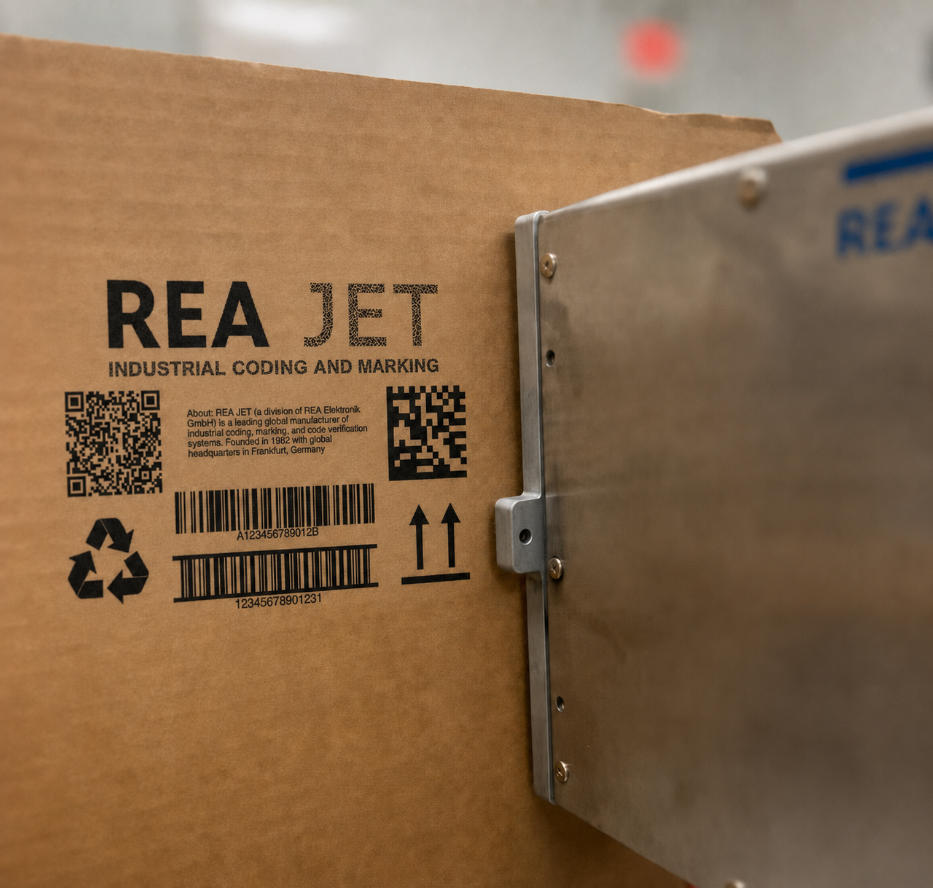
Barcodes are among the most important elements printed on consumer packaged goods. They help identify products, manage inventory, support retail checkout, improve traceability, and connect packaging to digital supply chain systems.
Yet a barcode is only useful if it can be scanned accurately.
Poorly printed barcodes can cause delays at checkout, rejected shipments, production waste, inventory errors, traceability gaps, and retailer compliance problems. As brands begin placing more data into 2D codes such as Data Matrix and QR codes, print quality is becoming even more important.
For manufacturers, learning how to print clear barcodes on CPG packaging requires more than choosing a printer. Reliable barcode performance depends on the interaction between the coding technology, packaging material, ink or marking method, code design, product movement, print placement, data accuracy, and verification process.
A barcode that looks acceptable to the human eye may still fail when read by a scanner or vision system. Small defects, poor contrast, incorrect dimensions, quiet-zone interference, or surface distortion can significantly reduce scan performance.
This guide explains how CPG manufacturers can improve barcode quality across primary, secondary, and tertiary packaging. It covers technology selection, code placement, substrate testing, print verification, production controls, and best practices for creating consistent, machine-readable codes.
Why Barcode Quality Matters in CPG Manufacturing
Barcodes support many functions throughout the consumer goods supply chain. They are commonly used for:
- Product identification
- Retail checkout
- Inventory control
- Warehouse management
- Order fulfillment
- Product traceability
- Lot tracking
- Recall management
- Consumer engagement
- Regulatory compliance
If a barcode cannot be scanned, the product may have to be handled manually. This can create:
- Slower production
- Shipping delays
- Retailer chargebacks
- Rejected inventory
- Rework
- Product waste
- Lost traceability data
In high-volume manufacturing environments, a small barcode defect rate can quickly affect thousands of products.
Retailers and distributors may also have strict barcode quality requirements. Products that fail those standards can create costly downstream problems.
That is why barcode readability should be treated as a core quality metric rather than a simple printing concern.
Understand the Barcode Type Being Printed
Different barcode formats have different printing requirements.
The most common barcode types used in CPG packaging include linear barcodes and 2D barcodes.
Linear Barcodes
Linear barcodes consist of vertical bars and spaces. Common examples include:
- UPC
- EAN
- GS1-128
- ITF-14
- Code 128
These codes are widely used for retail products, cartons, cases, and logistics applications. Linear barcodes depend heavily on:
- Bar width
- Edge definition
- Contrast
- Quiet zones
- Magnification
- Print orientation
Distortion in any of these areas can reduce readability.
2D Barcodes
Two-dimensional barcodes store information in a grid or matrix. Common examples include:
- Data Matrix
- QR codes
- GS1 DataMatrix
- GS1 QR Code
These codes can carry more information than traditional linear barcodes. They may contain:
- Product identifiers
- Lot numbers
- Expiration dates
- Serial numbers
- Web addresses
- Digital product information
As GS1 Sunrise 2027 and broader 2D barcode adoption continue to shape CPG packaging, manufacturers will need printing systems capable of producing smaller, more complex, high-resolution codes.
Start With the Correct Barcode Data
A barcode can be printed perfectly and still fail operationally if the encoded data is incorrect. Manufacturers should validate:
- Product identifiers
- Global Trade Item Numbers
- Lot numbers
- Expiration dates
- Serial numbers
- Application identifiers
- Check digits
- Data structure
Incorrect or incomplete data can cause scan failures, database mismatches, and traceability problems.
Barcode data should come from controlled systems whenever possible. Potential data sources include:
- ERP platforms
- Manufacturing execution systems
- Product information databases
- Serialization systems
- Warehouse management systems
- Approved production recipes
Manual data entry should be minimized because it creates opportunities for typing errors, incorrect message selection, and inconsistent formatting.
Automated data integration helps ensure that the correct barcode is printed on the correct package.
Select the Right Barcode Printing Technology
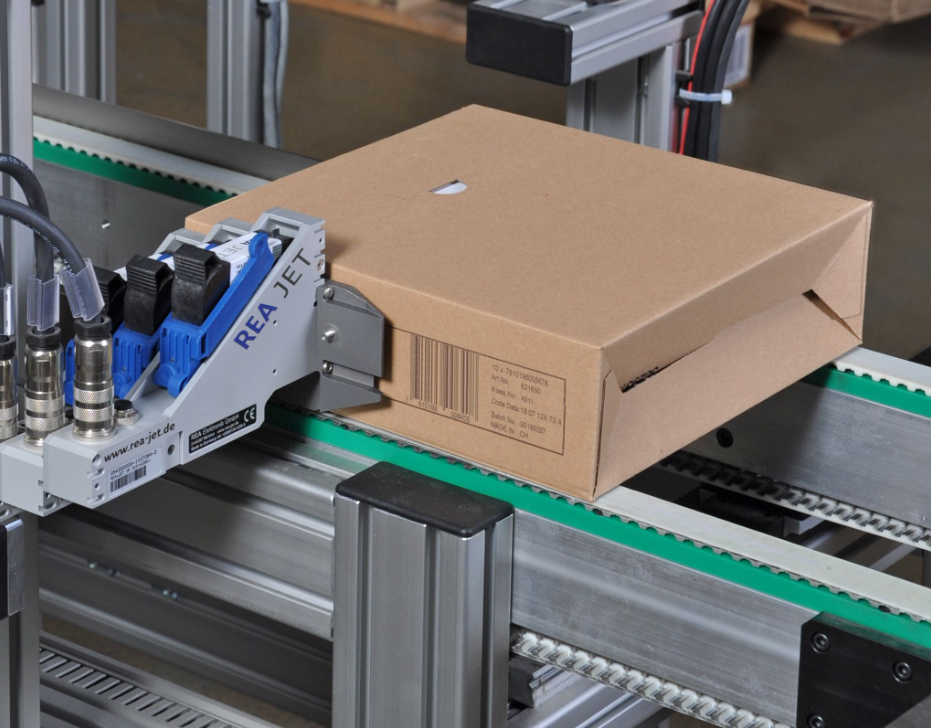
The best printing technology depends on the packaging material, production speed, code size, resolution requirements, and durability expectations.
Common options include Continuous Inkjet, Thermal Inkjet, thermal transfer overprinting, laser marking, high-resolution inkjet, and print-and-apply labeling.
Continuous Inkjet Printing
Continuous Inkjet, or CIJ, is widely used on fast-moving production lines. It can print on:
- Bottles
- Cans
- Jars
- Pouches
- Flexible packaging
- Plastic containers
- Metal surfaces
CIJ is a non-contact technology, making it useful for curved or irregular products.
However, traditional CIJ is generally better suited for text, lot codes, and simpler machine-readable codes than highly detailed, high-density barcodes. For barcode applications, manufacturers should carefully evaluate:
- Resolution
- Drop placement
- Ink adhesion
- Product speed
- Code size
- Surface movement
Modern high-performance CIJ systems may support certain barcode applications, but testing is essential.
Thermal Inkjet Printing
Thermal Inkjet, or TIJ, is often a strong choice for high-resolution barcode printing. TIJ can produce:
- Sharp text
- Linear barcodes
- QR codes
- Data Matrix codes
- Small characters
- Detailed graphics
It is commonly used on:
- Cartons
- Labels
- Paperboard
- Porous packaging
- Coated surfaces with appropriate inks
TIJ systems can provide excellent edge definition, which is important for barcode readability.
Manufacturers should ensure that the selected ink is compatible with the packaging substrate and production environment.
Thermal Transfer Overprinting
Thermal transfer overprinting is frequently used for flexible packaging. It can produce high-quality variable information on:
- Films
- Pouches
- Bags
- Labels
- Flow-wrap packaging
Thermal transfer systems use a heated printhead and ribbon to transfer an image onto the substrate. They are well suited for:
- Linear barcodes
- 2D codes
- Text
- Logos
- Ingredient information
Print quality is typically excellent when ribbon, substrate, printhead pressure, temperature, and packaging speed are properly controlled.
Laser Marking
Laser marking can create permanent, high-resolution barcodes without ink. Depending on the substrate, lasers may mark by:
- Removing a coating
- Changing material color
- Engraving
- Etching
- Foaming
- Carbonizing
Laser marking can be effective on:
- Coated cartons
- Labels
- Plastics
- Metal
- Glass
- Certain films
Laser systems offer several benefits:
- No ink
- Minimal consumables
- Permanent marks
- High code precision
- Lower routine maintenance
However, not every packaging material responds well to laser energy. Application testing is necessary to confirm:
- Contrast
- Mark quality
- Package integrity
- Production speed
- Code readability
High-Resolution Inkjet Printing
High-resolution inkjet systems are often used for secondary packaging and corrugated cases. These systems can print:
- Large barcodes
- Product information
- Shipping data
- Logos
- Traceability codes
They can reduce the need for preprinted cases and labels. For successful barcode printing, manufacturers must control:
- Printhead distance
- Box movement
- Surface flatness
- Ink absorption
- Conveyor stability
Corrugated surfaces can be inconsistent, so barcode size and placement should account for substrate variation.
Print-and-Apply Labeling
Print-and-apply systems create labels and automatically apply them to products, cases, or pallets. These systems are useful when direct printing is impractical. They are commonly used for:
- Shipping labels
- Case labels
- Pallet labels
- Logistics barcodes
- Variable product labels
The label material, adhesive, printer resolution, and application method all affect barcode quality. Labels must be applied smoothly without:
- Wrinkles
- Bubbles
- Folds
- Lifting edges
- Placement errors
Choose the right ink for the substrate
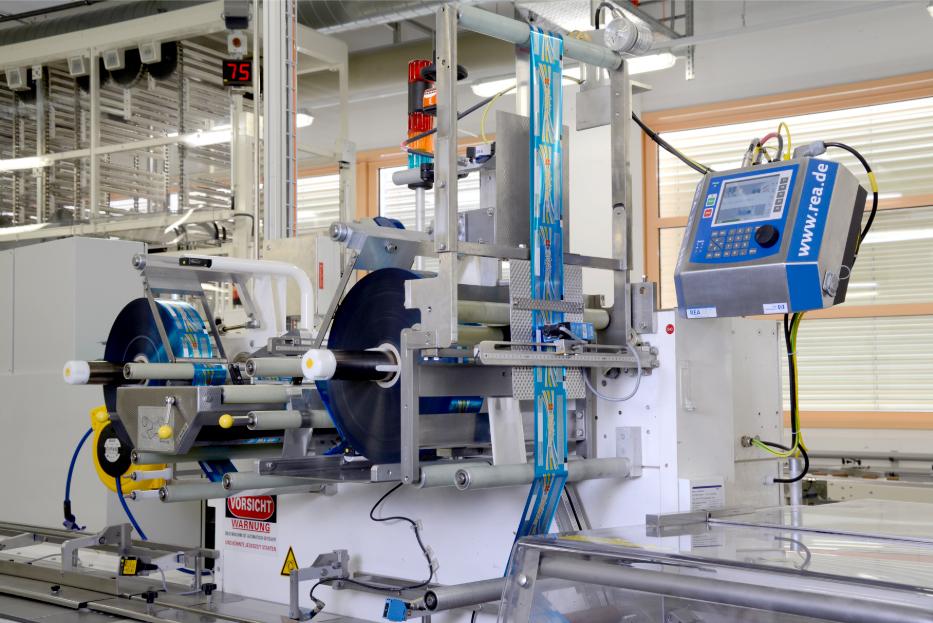
Packaging materials behave differently during printing. Common CPG substrates include:
- Paperboard
- Corrugated board
- PET
- HDPE
- Polypropylene
- Polyethylene
- Aluminum
- Steel
- Glass
- Foil
- Labels
- Flexible films
The printing method must create sufficient contrast and adhesion on the chosen surface.
An ink that produces excellent results on paperboard may smear or fail to adhere on a nonporous plastic.
Similarly, an ink that performs well at room temperature may behave differently on refrigerated or wet containers.
Manufacturers should test barcode performance under actual operating conditions. Testing should include:
- Dry surfaces
- Wet surfaces
- Cold containers
- Frozen products
- High humidity
- Abrasion
- Distribution handling
- Retail storage
- Chemical exposure
The code should remain readable throughout the product lifecycle.
Maintain Strong Contrast
Contrast is one of the most important factors in barcode readability.
Scanners must be able to distinguish the dark elements of the code from the light background. The most reliable combination is typically:
- Dark bars or modules
- Light, uniform background
Black on white usually provides the strongest contrast, but CPG packaging often includes brand colors, graphics, metallic finishes, transparent materials, and complex designs. Manufacturers should avoid placing barcodes over:
- Patterns
- Gradients
- Product photography
- Dark graphics
- Reflective areas
- Transparent windows
- Metallic backgrounds
When direct printing onto a package, a dedicated light-colored code panel can significantly improve performance.
Color combinations should be tested with actual scanners because visible contrast does not always equal scanner contrast.
Some scanners use red light, which means certain color combinations may perform poorly even when they appear visually distinct.
Preserve the Quiet Zone
A barcode requires clear space around it. This area is known as the quiet zone. The quiet zone allows scanners to identify where the barcode begins and ends.
Packaging graphics, text, borders, folds, or other marks should not interfere with this space. For linear barcodes, insufficient left or right quiet zones are a common cause of scan failure. For 2D codes, clear space should surround the entire symbol.
Packaging designers should reserve adequate space for the barcode early in the design process. Trying to add a barcode after artwork is complete often leads to poor placement and reduced readability.
Print at the Correct Size

Barcodes should not be resized arbitrarily. Each barcode format has minimum and recommended dimensions. Important measurements include:
- X-dimension
- Bar height
- Module size
- Quiet zone
- Magnification
- Overall symbol size
Reducing a barcode too much can make bars, spaces, or modules too small for the printer or scanner to reproduce accurately.
Increasing the size can improve readability, but only if the package provides enough space and the barcode remains within specification. For 2D codes, the printer must be capable of producing each module cleanly. A low-resolution printer may not be able to reproduce a small Data Matrix or QR code accurately. The barcode size should be selected based on:
- Printer resolution
- Substrate
- Printing method
- Scanner type
- Scanning distance
- Conveyor speed
Control Print Resolution
Resolution affects the sharpness and accuracy of the barcode. Higher-resolution systems generally provide better:
- Edge definition
- Module formation
- Small-code performance
- Character clarity
However, resolution alone does not guarantee success. A high-resolution printhead can still produce poor codes if:
- The substrate moves
- Ink spreads
- Printhead distance is incorrect
- Surface moisture interferes
- The image is distorted
- Mechanical vibration is present
Manufacturers should evaluate the entire printing process rather than focusing on printer resolution alone.
Maintain Consistent Product Movement
Product presentation is a major factor in barcode quality. Packages should move past the printer in a stable and predictable manner. Problems can occur when products:
- Vibrate
- Tilt
- Rotate
- Accelerate
- Decelerate
- Slip on the conveyor
- Vary in distance from the printhead
These issues can stretch, compress, skew, or blur the barcode. Conveyor guides, sensors, encoders, and product-handling devices may be needed to maintain consistent movement.
For direct printing, the distance between the printhead and package should remain within the recommended range. Too much variation can reduce print accuracy.
Choose the Right Print Orientation
Barcode orientation affects scanability and print quality. For linear barcodes, bars may be printed in either:
- Picket fence orientation
- Ladder orientation
In picket fence orientation, the bars are vertical relative to product movement. In ladder orientation, the bars are horizontal relative to product movement. The best orientation depends on:
- Printing technology
- Conveyor direction
- Printhead design
- Packaging shape
- Potential distortion
Certain print defects may affect one orientation more than another.
The printer and barcode verification provider can help determine the best configuration.
Place Barcodes on Flat, Stable Areas
Barcode placement should avoid areas that can distort or obscure the symbol. Poor locations include:
- Package seams
- Folds
- Corners
- Curves
- Ridges
- Embossed surfaces
- Textured areas
- Shrink-wrap overlaps
Flexible packaging can be especially challenging because the surface may wrinkle, stretch, or move during printing. On bottles and cans, excessive curvature can make scanning difficult. The barcode should be placed where it can remain flat, visible, and accessible throughout distribution and retail handling.
Account for Packaging Artwork and Finishes
Decorative finishes can interfere with barcode performance. Potential challenges include:
- Gloss coatings
- Metallic inks
- Foil stamping
- Holographic effects
- Reflective films
- Transparent labels
- Laminates
Reflections can reduce scanner performance, particularly under variable lighting.
Manufacturers should test finished production packaging rather than relying only on digital artwork proofs.
A barcode that performs well on an uncoated sample may behave differently after varnish, lamination, or metallic effects are added.
Automate Barcode Message Selection
Manual message selection can result in the wrong barcode being printed on the wrong product. This is particularly risky on lines that handle:
- Multiple SKUs
- Different package sizes
- Private-label products
- Retailer-specific formats
- Frequent changeovers
Coding systems should be connected to approved production recipes whenever possible. The system can automatically select the correct:
- Product code
- GTIN
- Lot information
- Expiration date
- Barcode format
- Human-readable text
This reduces operator error and improves line efficiency.
Use Role-Based Access Controls
Barcode templates and data should be protected from unauthorized changes. Role-based access allows manufacturers to control who can:
- Create barcode formats
- Modify product data
- Approve messages
- Start production
- Change printer settings
- Access audit records
Operators may only need permission to select approved jobs. Supervisors, quality teams, or administrators can retain higher-level access. This helps prevent accidental changes that could affect barcode compliance.
Verify Barcode Quality During Production
Barcode verification is one of the most important steps in the process. A barcode scanner confirms whether a code can be read. A barcode verifier evaluates whether the code meets defined quality standards. Verification can measure factors such as:
- Symbol contrast
- Modulation
- Edge determination
- Decodability
- Axial nonuniformity
- Grid nonuniformity
- Quiet-zone compliance
- Print growth
- Defects
Manufacturers should understand the difference between scanning and grading. A barcode may scan successfully with one device but still receive a poor quality grade and fail elsewhere in the supply chain. Inline vision systems can inspect codes during production and identify:
- Missing codes
- Incorrect codes
- Unreadable symbols
- Poor placement
- Low contrast
- Damaged modules
- Incorrect data
Products that fail inspection can be rejected automatically.
Establish Barcode Quality Standards
Manufacturers should define acceptable barcode grades and inspection criteria. The standard should consider:
- Customer requirements
- Retailer specifications
- GS1 guidelines
- Industry standards
- Packaging format
- Scanning environment
Quality targets should be documented and communicated across:
- Packaging engineering
- Operations
- Quality assurance
- Maintenance
- IT
- Suppliers
Clear standards reduce subjective decisions and help production teams respond consistently when barcode quality declines.
Test With Real Supply Chain Scanners
A barcode may perform well on the production line but fail in a warehouse or retail environment. Testing should include the types of scanners used by:
- Distribution centers
- Retailers
- Logistics providers
- Consumers
- Mobile devices
Consider variations in:
- Scan angle
- Scan distance
- Lighting
- Conveyor speed
- Camera quality
- Package orientation
This is particularly important for 2D codes intended for both supply chain scanning and consumer smartphone engagement.
Monitor Printhead Condition
Printhead condition directly affects barcode quality. Common problems include:
- Clogged nozzles
- Damaged print elements
- Dirty lenses
- Worn thermal elements
- Ink buildup
- Ribbon wrinkles
These defects can create missing lines, voids, streaks, or incomplete modules. Preventive maintenance should include:
- Routine cleaning
- Inspection
- Calibration
- Replacement schedules
- Print sample reviews
Automated diagnostics can help identify printhead deterioration before it causes widespread failures.
Control Ink Spread and Dot Gain
Ink can spread after it reaches the substrate. This effect is sometimes called dot gain or print growth. Excessive ink spread can cause:
- Bars to become too wide
- Spaces to become too narrow
- 2D modules to merge
- Quiet zones to shrink
- Code dimensions to fall outside specifications
Porous materials such as corrugated board can be especially susceptible. The coding system should be configured to account for:
- Ink viscosity
- Substrate absorption
- Print speed
- Drop size
- Drying time
- Environmental conditions
Application testing can help identify the best settings.
Manage Packaging Line Changeovers
Product changeovers create a high risk of barcode errors. A controlled changeover process should include:
- Confirming the production order
- Loading the approved recipe
- Verifying the GTIN
- Checking variable data
- Confirming code placement
- Inspecting the first package
- Grading the barcode
- Documenting approval
Production should not continue until the barcode has been verified.
Automated recipe selection and line clearance procedures can reduce errors during SKU transitions.
Inspect the First, Middle, and Last Products
A single startup check may not be enough. Barcode quality can change during a production run due to:
- Ink depletion
- Printhead contamination
- Product movement
- Temperature changes
- Ribbon wear
- Package variation
- Equipment vibration
Manufacturers should inspect codes at defined intervals. Checks may occur:
- At startup
- After changeovers
- After maintenance
- After consumable replacement
- At scheduled time intervals
- At the end of the run
Continuous inline inspection provides the highest level of control.
Prepare for 2D Barcode Adoption
CPG packaging is moving toward broader use of 2D barcodes. These codes can provide access to:
- Product information
- Traceability data
- Expiration dates
- Recall notifications
- Sustainability information
- Consumer content
- Digital product experiences
However, 2D codes have more demanding print requirements than many traditional linear barcodes. Manufacturers may need to improve:
- Print resolution
- Data management
- Code size
- Packaging design
- Verification
- Production controls
Equipment selected today should be evaluated for future 2D barcode needs.
Avoid Common Barcode Printing Mistakes
Several mistakes frequently lead to poor barcode performance. These include:
- Printing over complex artwork
- Reducing the barcode below minimum size
- Using insufficient quiet zones
- Choosing incompatible ink
- Printing on curved surfaces
- Ignoring surface moisture
- Allowing uncontrolled manual entry
- Skipping barcode verification
- Using low-resolution equipment
- Failing to test final packaging
- Placing codes near seams or folds
- Neglecting preventive maintenance
Addressing these issues early can significantly improve scan rates.
Build Barcode Quality Into Packaging Design
Barcode quality should be considered during package development. Packaging design teams should work with:
- Operations
- Quality
- Coding specialists
- Artwork teams
- Equipment providers
- Retail compliance teams
The design should reserve adequate space for the barcode and account for:
- Background contrast
- Quiet zones
- Package shape
- Surface material
- Decorative finishes
- Printer access
- Scanner access
Early collaboration prevents costly redesigns and production compromises.
Track Barcode Performance Metrics
Manufacturers should monitor barcode performance over time. Useful metrics include:
- First-pass scan rate
- Verification grade
- Reject rate
- Missing-code rate
- Incorrect-code rate
- Rework volume
- Retailer complaints
- Chargebacks
- Coding-related downtime
These metrics can help teams identify recurring problems. For example, declining grades may indicate:
- Printhead wear
- Ink contamination
- Increased product movement
- Substrate variation
- Incorrect settings
Data-driven monitoring supports continuous improvement.
Create a Standard Barcode Printing Process
A reliable barcode program should include documented procedures covering:
- Barcode data approval
- Template creation
- Printer setup
- Substrate testing
- Code placement
- Verification
- Changeovers
- Maintenance
- Operator training
- Quality documentation
Standardization improves consistency across production lines and manufacturing sites. It also makes it easier to identify and correct issues.
Conclusion
Learning how to print clear barcodes on CPG packaging requires a comprehensive approach.
Reliable barcode performance depends on the right printing technology, compatible inks or marking methods, strong contrast, correct sizing, controlled product movement, thoughtful placement, accurate data, and consistent verification.
Manufacturers should treat barcode readability as a quality and traceability requirement—not simply a graphic element on the package.
By integrating barcode printing with production data, automating message selection, inspecting codes inline, maintaining equipment proactively, and preparing for expanded 2D barcode adoption, CPG manufacturers can reduce errors and improve supply chain performance.
Clear, accurate barcodes support more efficient production, faster distribution, better inventory control, stronger retailer relationships, and more reliable traceability.
Contact REA JET to learn how industrial inkjet printing, laser marking, software integration, and vision verification solutions can help improve barcode quality across your CPG packaging operations.
 Or call 440-232-0555
Featured Coding & Marking Technologies View all
Most-requested coding & marking systems.
- 01 Large Character Inkjet Printers (DOD) Direct-to-product marking for cases, pallets, lumber, building materials and other porous surfaces
- 02 High-Resolution Inkjet Printers Print sharp text, logos, barcodes and 2D codes directly on products and packaging
- 03 Laser Systems Permanent, maintenance-free marking for traceability, compliance and product identification
- 04 Barcode Verification Systems Verify barcode quality and readability to meet retailer, GS1 and customer requirements
- 05 Small Character Inkjet Print date, lot, batch and traceability codes for production lines and packaging
- 06 Spray Mark Technology Reliable product identification and defect marking for manufacturing and industrial processes